AI-Generated Coin Artwork: What Can Actually Be Manufactured in Metal?
How to turn an AI coin design into a production-ready metal coin: raised relief, recessed backgrounds, readable lettering, clean outlines, vector files, and the mistakes to avoid before you order.
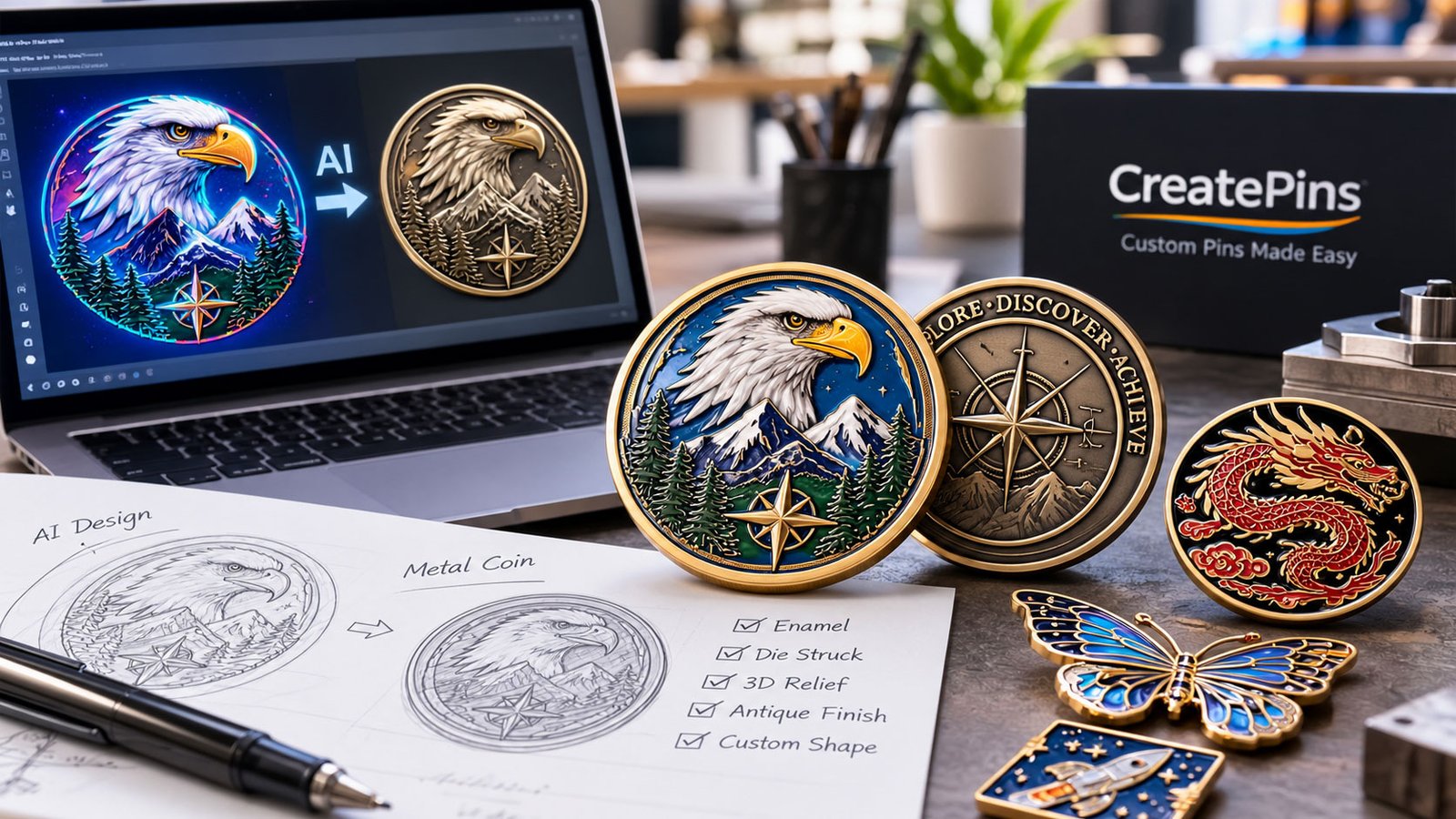
AI image generators make it easier than ever to create elaborate custom coin concepts. With a few prompts, designers can produce dramatic eagles, fantasy emblems, military-style insignias, intricate crests, futuristic symbols, and commemorative coin designs that look professionally finished. That makes AI-generated coin artwork an exciting starting point for anyone planning custom metal coin design.
But there is an important difference between an AI coin design image and a coin that can actually be manufactured.
A digital image can contain thousands of tiny details, smooth gradients, realistic shadows, intricate textures, and lettering that looks convincing at first glance. A physical metal coin must translate those visual elements into manufacturable features: raised relief, recessed backgrounds, engraved lines, enamel colors, readable text, and clean outlines. This is where many AI coin design projects encounter problems.
AI-generated coin artwork can be an excellent starting point for custom metal coin production, but it usually needs technical preparation before it becomes production-ready. Some elements must be simplified, others need to be redrawn, and certain visual effects must be recreated using actual metalworking, engraving, or coloring techniques.
In this guide, we explain how AI-generated coin artwork translates into physical metal coins, which design features manufacturers can reproduce, common production failures to avoid, and how to prepare your artwork for successful custom challenge coin manufacturing. If you are brand new to coins, start with our complete beginner’s guide to designing custom challenge coins. If you are working with pins as well, our AI enamel pin design guide covers the same ideas for pins.
1. Why AI Coin Design Files Need Manufacturing Preparation
AI coin design tools are designed to create visually appealing images. They do not automatically understand the physical limitations of metal stamping, die striking, casting, engraving, or enamel filling.
For example, an AI tool might generate a commemorative coin featuring:
- An eagle with hundreds of individual feather details.
- A mountain landscape with tiny trees and narrow outlines.
- A circular inscription with decorative lettering.
- A metallic background with realistic reflections and shadows.
- Several layers of overlapping symbols and ornamental borders.
These elements may look excellent on a screen. However, a physical coin has limited surface area, material thickness, relief depth, and feature spacing. A narrow line might disappear during production. A tiny letter might become unreadable. A realistic shadow may have no direct equivalent in metal. Two closely spaced details might merge into one raised area.
Whether you are planning a single award or a large run of AI-generated challenge coins, the same rule applies: good custom metal coin design starts with physical constraints, not just a beautiful render.
The challenge is not simply to reproduce the picture. It is to interpret the picture as a three-dimensional or surface-treated metal object.
AI-generated coin artwork versus production-ready coin artwork
| AI-generated coin artwork | Production-ready coin artwork |
|---|---|
| Prioritizes visual appearance | Prioritizes appearance and manufacturability |
| May contain simulated shadows and reflections | Defines actual raised, recessed, or colored areas |
| Can include irregular or distorted lettering | Uses verified, readable text |
| May contain extremely fine details | Uses details appropriate for the coin’s size |
| Often has soft or inconsistent boundaries | Uses clean, clearly defined outlines |
| May be a flattened raster image | Typically includes editable vector artwork or other manufacturer-approved production files |
A manufacturer may be able to reproduce the overall appearance of an AI coin design, but the final result depends on the coin’s dimensions, production method, metal finish, coloring requirements, and level of detail. The best approach is to treat AI as a concept-generation tool and use vector illustration and manufacturing review to prepare the final design. For a broader look at why some artwork cannot be made as drawn, see why a design can’t be manufactured: 15 common reasons.
2. Raised Relief and Recessed Backgrounds in Custom Metal Coin Design: Turning an Image into Metal
One of the most important steps in custom metal coin design is deciding which areas should be raised and which should be recessed. These physical differences create the tactile and visual character of a coin.
What is raised relief?
Raised relief refers to design elements that stand above the surrounding surface of the coin. Common raised elements include:
- Text and lettering.
- Logos, emblems, and central symbols.
- Portraits, animals, and silhouettes.
- Borders, stars, and decorative ornaments.
- Selected outlines separating different design areas.
For example, an AI coin design showing an eagle against a circular background might be manufactured with the eagle’s body, beak, feathers, and outer silhouette raised above the surrounding field. However, not every feather or facial detail needs to become a separate raised feature. Excessively complex relief can be difficult to reproduce cleanly, especially on smaller coins.
What is a recessed background?
Recessed areas sit below the surrounding raised design. A manufacturer may use recessed backgrounds to create contrast around a logo, separate lettering from the central emblem, or provide space for enamel coloring.
Imagine a coin with a raised compass in the center. The surrounding circular field could be recessed, allowing the compass to stand out through differences in height, reflection, and surface finish. Recessed areas can also receive different finishes or enamel colors, depending on the production method.
How AI images should be converted into relief
An AI coin design image often uses light and shadow to suggest depth. These effects are not automatically equivalent to physical relief. Consider a digital eagle with bright highlights on its wings and dark shadows beneath its feathers. A production artist must decide which features should be actual raised metal, which should remain recessed lines, and which are simply lighting effects that should be removed.
A practical conversion process is:
- Identify the main subject and major design elements.
- Separate raised metal areas from recessed background areas.
- Simplify overlapping details that would create ambiguous relief.
- Establish consistent outlines and boundaries.
- Review the relief plan at the coin’s actual size.
For some designs, a manufacturer may recommend a combination of raised metal, recessed fields, and printed details rather than attempting to reproduce every feature through relief alone.
Good custom metal coin design always begins by deciding what is raised, what is recessed, and what is simply a lighting effect inside the AI coin design.
Key takeaway: A realistic-looking AI image does not define its own relief structure. Raised and recessed areas must be deliberately designed for physical production.
3. Fine Details: What Happens to Tiny Features on Metal Coins?
AI-generated coin artwork frequently contains more detail than a small metal coin can reproduce clearly. This is particularly common in fantasy coins, military emblems, animal portraits, architectural illustrations, and highly ornamental designs.
A digital eagle may contain dozens of fine feather lines. A dragon may have individual scales, claws, teeth, and facial textures. A historical crest may include small decorative leaves and tightly packed symbols. Whether these details survive production depends on their size, spacing, depth, manufacturing method, and the coin’s overall dimensions. Treat every tiny detail in AI-generated coin artwork as a question: will it still be visible on the finished coin?
Why small details disappear or merge
Lines become too shallow
Fine grooves may lose definition.
Narrow gaps close up
Closely spaced raised features can merge.
Small shapes lose their identity
Individual feathers, scales, or ornaments may become indistinguishable.
Crowded relief looks muddy
Too many overlapping elements reduce visual separation.
Surface finishing changes the appearance: polishing and plating can soften the appearance of particularly fine features.
There is no single minimum line width or spacing that works for every coin. Suitable dimensions depend on the metal, die or mold process, relief depth, coin size, and factory capabilities. For pin-based reference points, see our production specifications guide on line thickness, text, and colors.
How to simplify AI-generated details
Start by identifying the elements that make the design recognizable. For an eagle, these might be the beak, eye, wing silhouette, and overall feather arrangement. For a company logo, they might be the lettering, central icon, and outer shape. Preserve those defining features first, and simplify details that contribute little to recognition.
A useful rule is to review the design at its intended physical size rather than relying on a zoomed-in screen view. If a feather pattern looks impressive at 800% magnification but becomes a dark, indistinct patch when viewed at the final coin size, it needs simplification.
Do not remove all fine detail automatically. Experienced coin designers can often preserve intricate artwork by adjusting line spacing, increasing the size of key features, or using a different production technique. Our comparison of minimalist vs. detailed designs shows how much detail small metal products can realistically carry.
4. Readable Lettering on AI-Generated Coin Artwork: Fix AI Text Before Manufacturing
Text is one of the most common weak points in AI-generated coin artwork. Image generators can create lettering that resembles a word without spelling it correctly. They may distort individual characters, repeat letters, change spacing, or produce decorative text that cannot be reliably read. These issues are especially noticeable on challenge coins, commemorative coins, corporate coins, and coins featuring names, dates, mottos, or unit insignias.
Why AI-generated lettering causes problems
Circular text is particularly challenging because it combines curved placement with tight spacing. A design might contain an organization name around the outer ring, a date at the bottom, and a short motto across the center. Even if the lettering looks acceptable in the original image, the actual wording may be incorrect or the letters may be too small to reproduce cleanly. When this artwork is converted into a manufacturing file, distorted characters do not automatically become correct typography.
How to correct coin lettering
Use the AI-generated image as a reference, then replace the lettering with real text using a vector design application. Recommended steps include:
- Verify every word. Check names, dates, abbreviations, slogans, and spelling.
- Choose an appropriate typeface. Avoid unnecessarily thin or highly decorative fonts for small lettering.
- Adjust circular text manually. Check alignment, spacing, and the position of each character.
- Increase readability. Enlarge text or simplify surrounding ornaments if space is limited.
- Review at actual size. Make sure the smallest lettering remains legible when the coin is viewed at its intended dimensions.
Text can be represented as raised metal, recessed lettering, or printed artwork, depending on the desired effect and production method. Converting text to vector outlines may be appropriate for final production files, but keep an editable version of the text as well so corrections remain possible. Fixing lettering is the fastest way to improve AI-generated coin artwork before custom challenge coin manufacturing begins. For coins with detailed lettering around a narrow outer ring, a simplified font often produces a better result than an elaborate typeface. Our typography guide for small metal products explains font size, line thickness, and spacing in depth.
5. Clean Outlines and Coin Borders in Custom Metal Coin Design
AI coin design concepts often include multiple rings, decorative borders, ornamental edges, and intricate silhouettes. These details can give a coin a premium appearance, but they also require clear boundaries. In metal coin production, outlines are more than decorative strokes. They help define raised and recessed regions, separate colors, and establish the overall shape of the design.
Common outline problems
Inconsistent line thickness
AI-generated coin artwork may contain outlines that change thickness unexpectedly. When converted into metal features, these inconsistencies can create an uneven appearance.
Overlapping boundaries
Two nearby outlines may overlap or intersect, making it unclear which area should be raised or recessed.
Tiny decorative gaps
Small openings in an ornamental border may close during manufacturing, particularly when the coin is small.
Irregular outer contours
If the coin is intended to have a custom-cut shape, the outer contour must be clearly defined and suitable for the chosen manufacturing process.
How to prepare clean outlines
Trace the principal shapes using vector paths. Inspect intersections, remove unnecessary overlaps, and make sure each design region has a clear boundary. For a standard round coin, the outer circular edge should be distinct from any internal decorative rings. For a custom-shaped coin, the cutting contour should be identified separately from the internal artwork.
The outline thickness and spacing should be reviewed against the intended coin size and the manufacturer’s production requirements. Avoid assuming that every decorative line must be reproduced as raised metal. Some fine details may work better as recessed lines, engraving, or printed elements. A clean, simplified outline often produces a more professional coin than a complicated design with ambiguous boundaries, and it makes custom metal coin design easier to quote, review, and approve.
6. Can an AI Coin Design’s Gradients, Shadows, and Metallic Effects Be Reproduced?
AI coin design tools are particularly good at producing realistic metal textures, glowing highlights, soft shadows, and dramatic lighting. However, a physical metal coin does not reproduce all these effects in the same way as a digital image. Understanding the difference helps designers choose the right production technique.
Metallic gradients and reflections
A digital image may show gold transitioning into bronze, or silver reflecting blue and purple light. On a real coin, the metallic appearance primarily comes from the metal or plating finish and the way light reflects from the surface. A digital gradient does not automatically translate into a gradient in the physical metal. Depending on the design, the effect may be approximated through different plating treatments, colored finishes, enamel, or printing.
Soft shadows and glow effects
Shadows in AI-generated coin artwork usually describe the lighting of the scene, rather than an actual feature on the coin. These shadows should normally be removed or reinterpreted during vector conversion. Glow effects, lens flares, and soft atmospheric transitions may require printing or other decorative techniques rather than traditional raised relief.
Complex textures
Stone, leather, fabric, weathered metal, and other textures can be attractive in a digital concept. Some textures can be recreated through engraving or surface treatments, but highly detailed photographic textures may not translate well into physical relief. The solution is to identify the visual effect that matters most and choose a suitable manufacturing approach.
For example, a dark recessed background surrounding raised polished metal may create a strong contrast without reproducing every shadow from the original AI coin design. The objective is not necessarily to duplicate every pixel. It is to preserve the design’s visual identity using techniques that work on a physical object. When reviewing an AI coin design, ask which gradients are essential and which can be replaced by finish choices. Learn more about why finished colors differ from screens in why enamel colors look different from your screen mockup.
7. Why AI Artwork Needs Vector Conversion
A high-resolution AI image is not necessarily a production-ready coin design. Many AI tools produce raster images, such as PNG or JPEG files. These images are composed of pixels and may contain soft edges, blended colors, and subtle transitions. Vector artwork uses paths, curves, and defined shapes that can be edited and scaled without the same pixel-based limitations.
For custom challenge coin manufacturing, vector files are often useful because they make it easier to identify boundaries, adjust lettering, separate design elements, and prepare artwork for production. See our guides to the best file formats (AI vs. PSD vs. PNG) and whether you can make a product from a PNG or JPG.
What should a production-ready vector file contain?
A properly prepared file should generally include:
- Clean, editable paths for the main artwork.
- Corrected and verified lettering.
- Clearly defined raised and recessed regions.
- Consistent outlines and spacing.
- Separate color regions where enamel or printing is required.
- A clearly identified outer cutting contour when applicable.
- The correct dimensions and proportions.
- A clear distinction between actual design features and visual effects.
Depending on the manufacturer and production method, the file may also need specific layers, color references, relief instructions, or a technical drawing.
AI-generated coin artwork should not simply be converted into vector format with an automatic tracing tool and assumed to be finished. Automatic tracing can create excessive anchor points, rough curves, overlapping shapes, and unnecessary complexity. These problems may make the file harder to edit and less suitable for production. A clean vector file is the bridge between AI-generated coin artwork and reliable custom challenge coin manufacturing.
A practical AI-to-vector workflow
- Generate the conceptUse an AI image generator to explore the coin’s composition, subject, style, colors, and overall appearance.
- Select the strongest conceptChoose an image with a clear central subject, readable layout, and a manageable number of details.
- Correct the designFix spelling, remove unwanted artifacts, adjust proportions, and simplify details that are too small.
- Rebuild the artwork as vectorsTrace or redraw the important elements using a vector illustration application. Replace AI-generated text with proper typography.
- Define production featuresIdentify raised metal, recessed areas, enamel colors, printed elements, borders, and the outer contour.
- Check the design at actual sizeReview the smallest lettering, narrowest gaps, line thicknesses, and overall visual balance.
- Request a manufacturing reviewSend the artwork to your coin manufacturer for feedback on feasibility, dimensions, relief, and any adjustments required for production.
- Approve the production proofReview the final digital mockup or technical proof before authorizing production. Confirm that the wording, layout, colors, finishes, and major design features match the agreed specifications.
The exact workflow varies by manufacturer. Some factories can help convert a concept into production artwork, while others require more complete vector files from the customer. To understand what happens at the proof stage, read our sample approval process explained.
8. Common AI Coin Design Failures and How to Fix Them
The following table summarizes problems that can often be identified before an order is placed.
| Common failure | Why it happens | Recommended fix |
|---|---|---|
| Distorted text | AI image generators do not reliably preserve exact lettering | Replace it with verified vector typography |
| Feather or scale details merge together | Fine features are too crowded for the chosen coin size or process | Simplify patterns and increase spacing |
| Raised and recessed areas are unclear | Digital lighting is mistaken for actual relief | Define physical levels in the artwork |
| Thin outlines disappear | Lines are too fine for the selected manufacturing process | Adjust line thickness with manufacturer guidance |
| Tiny lettering becomes unreadable | Text is too small or uses an unsuitable font | Enlarge, simplify, or reposition the text |
| Gradients look different on the finished coin | Digital gradients do not automatically translate into metal finishes | Use suitable plating, enamel, or printing techniques |
| The vector file is difficult to edit | Automatic tracing creates excessive or overlapping paths | Clean up and rebuild key shapes |
| Outer edges look uneven | The cutting contour is unclear or overly complex | Define and review the coin’s outer profile |
| Colors cross into neighboring areas | Color boundaries are not clearly separated | Create distinct color regions and review their outlines |
| Fine details look muddy after finishing | Relief, spacing, and surface treatment interact | Simplify crowded features and confirm feasibility before production |
Not every issue requires redesigning the entire coin. Often, a few targeted changes can preserve the original concept while making it more practical to manufacture. Catching these issues early keeps AI-generated challenge coins on schedule and on budget. Our guide to common AI mistakes and how to fix them and 20 common design mistakes that can ruin your order go further.
9. Which Production Method Works Best for Custom Challenge Coin Manufacturing?
Match the method to the artwork: the right process makes every AI coin design detail easier to reproduce. The most appropriate manufacturing method depends on the artwork, desired appearance, budget, coin dimensions, and required level of detail.
Die-struck or stamped coins
Die-struck coins use pressure to form the design in metal. They are well suited to designs that emphasize raised and recessed features, clean lettering, and contrasting metal surfaces. They can work particularly well for classic commemorative coins, organizational emblems, and designs with strong silhouettes. However, the artwork must be suitable for the available relief and spacing.
Die-cast coins
Die-cast production forms a design using molten metal and a mold. It can accommodate certain complex shapes and three-dimensional forms, depending on the material and manufacturing process. Casting does not make every tiny AI-generated detail reproducible. Fine features still require suitable dimensions, spacing, and mold design.
Enamel-colored coins
Coins with soft or hard enamel combine metal features with colored recessed areas. The metal boundaries separate the enamel colors and contribute to the finished appearance. This approach works well for logos, symbols, flags, and designs with clearly defined color regions. Very small compartments or intricate color patterns may need simplification.
Coins with printed details
Printing can reproduce certain details that are difficult to achieve through traditional relief or enamel, including gradients, small illustrations, and some multicolor effects. A printed coin can be useful when the AI coin design relies on a more illustrative or painterly appearance. However, printing has different visual and durability characteristics from raised metal and enamel.
The appropriate combination depends on the desired result and the manufacturer’s capabilities. To compare finishes, read hard enamel vs. soft enamel and UV printing vs. screen printing for pins, coins, and badges.
There is no universally best production method for AI-generated coin artwork. The best choice is the method that preserves the most important visual features while meeting the project’s manufacturing and cost requirements.
10. How to Prepare Your AI Coin Design Before Requesting a Quote
Before sending an AI coin design concept to a manufacturer, prepare a clear brief that explains what you want the finished product to look like. This can reduce misunderstandings, prevent avoidable artwork revisions, and help the manufacturer recommend an appropriate production method. Use the following checklist.
- Coin size: Specify the intended diameter or dimensions.
- Shape: Confirm whether the coin is round or custom-shaped.
- Main artwork: Identify the central subject and the most important visual features.
- Text: Verify all wording, dates, names, and abbreviations.
- Relief: Indicate which elements should stand out and which should sit below the surface.
- Colors: Identify enamel colors, printed areas, and any special color effects.
- Metal finish: Specify the preferred finish, such as gold, silver, antique gold, or black nickel, where available.
- Fine details: Highlight features that must remain recognizable.
- Reference image: Include the original AI-generated concept for visual reference.
- Editable artwork: Supply vector files if available, while allowing the manufacturer to advise on the final file requirements.
- Quantity and intended use: Explain the order quantity and whether the coins are intended for awards, events, gifts, collectors, or resale.
If you do not have production-ready vector artwork, ask whether the manufacturer can assist with artwork preparation. A complete brief helps a factory quote custom challenge coin manufacturing accurately for your AI-generated coin artwork. You can also ask for a technical review before approving the final design. This is especially helpful for small coins, detailed lettering, complex custom outlines, and designs that combine raised relief with multiple colors. Budgeting? See our custom challenge coin pricing guide.
11. Can You Use AI-Generated Challenge Coins and Artwork for Custom Orders?
Many buyers now request AI-generated challenge coins for events, teams, and brands, and the same preparation steps apply to every one. Yes, AI-generated challenge coins can start from an AI coin design, provided the final design is technically feasible and the relevant rights and permissions are addressed. AI is particularly useful for exploring visual concepts that might otherwise take considerable time to sketch, including:
- Military-style and organizational emblems.
- Corporate anniversary coins.
- Event and conference souvenirs.
- Sports and achievement awards.
- Fantasy and gaming-inspired coins.
- Personalized gifts and commemorative designs.
- Collector coins based on original artwork.
However, the generated image should be reviewed before production. Check for distorted text, unintended symbols, inconsistent details, and visual elements that are too intricate to manufacture. If the design incorporates a third-party logo, recognizable character, trademark, or protected artwork, confirm that you have the necessary rights or authorization to use it.
AI-generated coin artwork does not automatically guarantee that a design is free of intellectual property restrictions. For commercial projects, it is also worth checking the applicable AI tool’s terms and any relevant rules in the jurisdiction where the design will be used. Ultimately, AI can accelerate the creative process, but successful custom challenge coin manufacturing still depends on sound design decisions and careful production preparation. Curious how coins compare with other badges? Read custom emblems vs. enamel pins, or weigh AI vs. human designers.
12. Frequently Asked Questions About AI-Generated Metal Coin Designs
Can a manufacturer make a metal coin directly from an AI-generated image?
Sometimes the image can serve as a starting reference, but it usually needs additional preparation. The manufacturer may need to correct text, simplify fine details, define raised and recessed regions, and create production-ready artwork. Whether a raster image can be used directly depends on the factory’s workflow and the chosen production method.
Does AI-generated coin artwork need to be converted to vector format?
Vector artwork is often preferred because it makes boundaries, lettering, shapes, and color regions easier to edit and prepare for production. However, exact file requirements vary by manufacturer and manufacturing process. A vector file should be reviewed for clean paths and correct design geometry rather than relying on automatic tracing alone.
Can AI-generated images be turned into 3D relief coins?
Yes, suitable concepts can be adapted into raised and recessed metal designs. However, the image’s shadows and highlights must be interpreted as actual physical features. More complex three-dimensional designs may require additional modeling or specialized manufacturing preparation.
What AI coin design details are most difficult to manufacture?
Common challenges include extremely fine lines, tiny lettering, tightly packed textures, overlapping outlines, and gradients that rely on digital lighting. Their feasibility depends on the coin’s size, material, relief, and production method.
Can gradients and realistic colors be reproduced on custom metal coins?
Some effects can be approximated with printing, enamel, or suitable surface finishes. However, a digital gradient does not automatically become a physical metal gradient. The manufacturer should review the design and recommend an appropriate technique.
What is the best size for a detailed custom coin?
There is no single ideal size for every design. Larger coins generally provide more space for lettering and intricate features, while smaller coins require greater simplification. The appropriate dimensions should be determined by the design and manufacturing requirements.
Can a manufacturer fix my AI-generated coin artwork?
Some manufacturers offer artwork preparation or design assistance, while others expect customers to provide production-ready files. Ask about artwork support when requesting a quote, and confirm whether revisions are included in the service.
Should I approve a digital mockup before production?
Yes. A production proof or mockup is an important opportunity to verify the wording, proportions, layout, colors, and intended finishes before manufacturing begins. For highly detailed designs, ask whether additional technical review is needed beyond a visual mockup.
Final Thoughts: Turn Your AI Coin Concept into a Manufacturable Design
AI-generated coin artwork offers an accessible way to explore ideas for custom metal coins, from corporate commemoratives to detailed collector designs. But attractive digital artwork is only the beginning of the manufacturing process.
The most important steps are to define raised and recessed areas, preserve readable lettering, simplify details that are too fine, create clean outlines, and prepare suitable vector artwork. The final design must also account for the coin’s dimensions, surface finish, coloring method, and manufacturing process.
Remember that AI coin design is the starting point, and custom metal coin design is what turns it into a real coin.
The goal is not to reproduce every pixel of an AI coin design. It is to preserve the features that make the design distinctive in a form that can be manufactured reliably.
If you have an AI coin design concept, share the reference image, intended size, quantity, and preferred finish with your manufacturer. A review before production can help identify technical issues early and determine the best way to turn your concept into a physical metal coin.
Ready to Turn Your AI Coin Concept into Metal?
At CreatePins, careful artwork preparation and production planning help bridge the gap between a digital design and a finished custom product. Share your AI-generated coin artwork, size, quantity, and preferred finish, and we’ll review it before production.