How to Choose AI tools for Enamel Pin Design (2026 Comparison Guide)
A beginner-friendly breakdown of which AI image generator for custom pins actually produces manufacturing-ready enamel pin artwork — including ChatGPT enamel pin prompts, a Midjourney enamel pin guide, and practical tips for using all three AI tools for Enamel Pin Design.
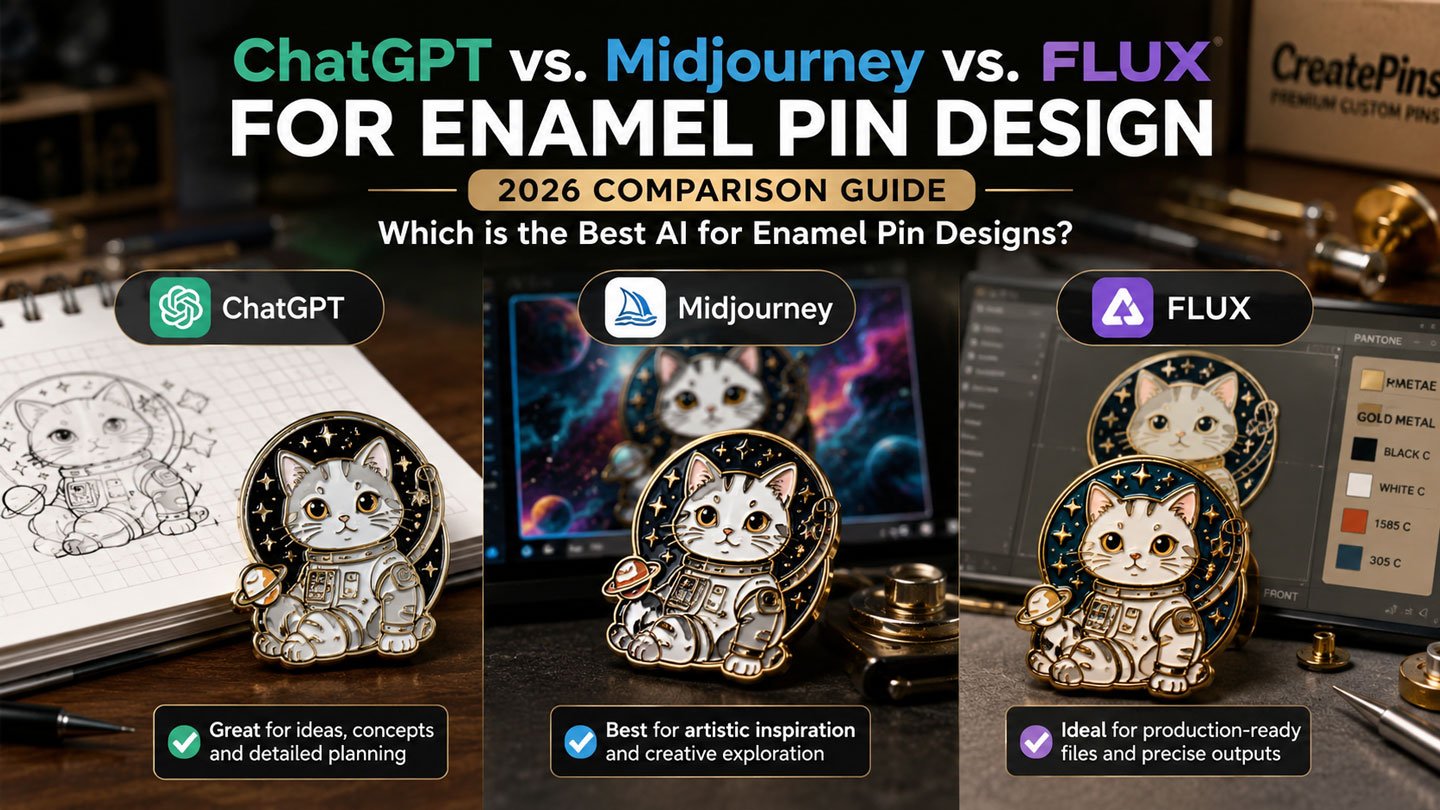
If you’re new to designing custom merchandise, choosing the best AI for enamel pin design can feel overwhelming. There are dozens of AI tools for Enamel Pin Design out there, but only a handful actually produce artwork that’s easy to turn into a real, physical pin. This guide is written specifically for beginners who want a clear, practical answer to one question: which AI image generator for custom pins should you actually use?
Artificial intelligence has completely changed how hobbyists, small businesses, and creators develop custom merchandise. Whether you’re designing enamel pins for your Etsy shop, launching a Kickstarter campaign, creating convention exclusives, or producing branded promotional products, the right AI image generator for custom pins can dramatically speed up the creative process — sometimes turning a rough idea into a finished concept in minutes instead of days.
Among the most popular AI tools for Enamel Pin Design today are ChatGPT Images, Midjourney, and FLUX. Each tool has its own strengths, weaknesses, and ideal use cases. While all three can generate eye-catching artwork, they don’t produce the same type of results — and not every AI-generated illustration is suitable for enamel pin manufacturing. In this ChatGPT vs Midjourney vs FLUX for Enamel Pin Design comparison, we’ll walk through exactly what separates a pretty picture from a pin-ready design.
If your goal is to create production-friendly pin concepts, choosing the best AI for enamel pin design from the start can save you hours of editing and reduce back-and-forth revisions with your manufacturer. Below, we compare all three tools from the perspective of enamel pin design specifically — covering image quality, prompt accuracy, editing capabilities, manufacturing suitability, learning curve, and overall value for beginners.
Quick Comparison Table
| Feature | ChatGPT Images | Midjourney | FLUX |
|---|---|---|---|
| Prompt Understanding | ⭐⭐⭐⭐⭐ | ⭐⭐⭐⭐☆ | ⭐⭐⭐⭐⭐ |
| Manufacturing-Friendly Results | ⭐⭐⭐⭐⭐ | ⭐⭐⭐☆ | ⭐⭐⭐⭐☆ |
| Artistic Creativity | ⭐⭐⭐⭐☆ | ⭐⭐⭐⭐⭐ | ⭐⭐⭐⭐☆ |
| Easy Editing | ⭐⭐⭐⭐⭐ | ⭐⭐⭐ | ⭐⭐⭐⭐ |
| Style Consistency | ⭐⭐⭐⭐⭐ | ⭐⭐⭐⭐☆ | ⭐⭐⭐⭐☆ |
| Beginner Friendly | ⭐⭐⭐⭐⭐ | ⭐⭐⭐ | ⭐⭐⭐⭐ |
| Best For | Production concepts | Creative artwork | Clean illustrations |
Understanding Enamel Pin Manufacturing (Before You Prompt Anything)
Before comparing AI image generator for custom pins options, it helps to understand what a manufacturer actually needs from your artwork — this is the part most beginners skip, and it’s the reason so many AI-generated designs need heavy rework later.
Unlike a digital illustration you’d post online, an enamel pin is a physical metal product. Every design has to be converted into vector line art with raised metal borders that separate each enamel color, almost like a stained-glass window. A photorealistic image with soft shadows and blended colors simply can’t be manufactured as-is; it has to be simplified first.
A production-ready design typically requires:
- Flat, solid colors with no gradients
- Thick metal outlines separating every color area
- Simple, readable shapes rather than fine detail
- A limited color palette (usually 6–8 enamel colors)
- Details that stay legible at 1–1.5 inches
- Clear, closed separation between every enamel area
An AI image generator for custom pins that naturally creates cleaner, flatter artwork will almost always require fewer revisions before it goes into production. That’s the lens we’ll use throughout this comparison. If you want a deeper primer on this topic before you start prompting, our Complete Enamel Pin Design Guide is great beginner starting point.
ChatGPT Images
Overview
ChatGPT Images excels at understanding detailed instructions and refining artwork through natural conversation. Instead of generating a single image and starting completely over if it’s wrong, you can iteratively improve the design by simply asking for specific changes — “make the outline thicker,” “remove the shadow,” “reduce it to five colors.” For enamel pin creators, this conversational workflow is especially valuable because manufacturing almost always involves multiple rounds of refinement before a design is approved.
This is one of the biggest reasons ChatGPT has become a favorite among beginners exploring ChatGPT enamel pin prompts — you don’t need to be a prompt-engineering expert. You can describe your idea in plain English, see the result, and adjust it step by step until it looks close to what your manufacturer needs. This makes it a top contender for the best AI for enamel pin design among first-time creators.
Strengths
- Excellent prompt comprehension, even for casual, conversational descriptions
- Understands manufacturing constraints like outlines and flat color
- Easy to request revisions without rewriting your whole prompt
- Strong consistency across iterations of the same character or mascot
- Produces clean, centered compositions
- Genuinely beginner friendly — minimal learning curve
Weaknesses
- May occasionally simplify artwork more than you’d like
- Some highly artistic or painterly styles may need extra prompting to achieve
Example Beginner Prompt
Here’s a real example of a manufacturing-oriented ChatGPT enamel pin prompt you can copy and adapt:
Gold metal outlines.
Flat vector illustration.
Maximum six solid enamel colors.
Centered composition.
Suitable for a 1.5-inch die-struck enamel pin.
Negative Prompt: No gradients, shadows, glow, realistic textures, or thin lines.
Best For
Manufacturing-ready concepts, logo pins, business branding, mascots, product development, and iterative design refinement — basically anything where you’ll be going back and forth with a manufacturer before finalizing artwork.
Midjourney
Overview
Midjourney is renowned for producing visually stunning artwork with cinematic lighting, rich textures, and imaginative compositions. It excels at generating inspirational concept art, which makes it a favorite among artists and creative professionals who want a design that feels dramatic and eye-catching before it’s simplified for manufacturing.
For beginners exploring a Midjourney enamel pin guide for the first time, it’s important to set expectations: Midjourney artwork usually looks incredible on screen, but it typically needs more cleanup before it can become a physical pin, because the tool naturally leans toward realism, texture, and lighting effects. Still, its artistic power makes it a popular AI tool for Enamel Pin Design when you need inspiration.
Strengths
- Outstanding artistic quality and visual polish
- Beautiful, painterly color palettes
- Highly creative, dynamic compositions
- Exceptional for fantasy-style artwork
- Excellent visual storytelling within a single image
Weaknesses
- Frequently adds unnecessary textures that don’t translate to enamel
- Often generates gradients and lighting effects that must be flattened later
- More editing required before the design is manufacturing-ready
- Less conversational editing workflow compared to ChatGPT
Best For
Fantasy pins, anime-inspired artwork, collector designs, Kickstarter campaign art, and early-stage creative brainstorming where you want inspiration more than a finished production file. This Midjourney enamel pin guide tip is especially useful for concept exploration.
FLUX
Overview
FLUX has become increasingly popular among pin designers because it follows prompts accurately while producing clean, graphic-style artwork. Many designers appreciate its ability to generate simplified illustrations that require noticeably fewer manufacturing adjustments than the highly artistic, textured renders you’d typically get from a tool built for cinematic imagery.
If you’re a beginner comparing every AI image generator for custom pins currently available, FLUX is worth trying as a middle ground: it’s more graphic and flat than Midjourney by default, while still offering more artistic range than a purely conversational tool. It’s a solid choice among AI tools for Enamel Pin Design for those who want a balance.
Strengths
- Excellent prompt accuracy
- Clean, graphic-style illustrations by default
- Strong vector-inspired appearance
- Good balance between creativity and simplicity
- Fast iteration between prompt variations
Weaknesses
- Smaller style ecosystem than some competitors
- May require some experimentation for niche or unusual aesthetics
Best For
Vector-style artwork, logo concepts, minimalist pins, corporate branding, and manufacturing-friendly illustrations that need to stay clean without a lot of manual cleanup.
Detailed Comparison Categories
1. Prompt Understanding
When you specify production requirements such as “bold metal outlines,” “six solid colors,” or “manufacturing-ready,” ChatGPT and FLUX generally adhere more closely to those instructions than Midjourney, which often prioritizes artistic interpretation over literal accuracy. For reliable ChatGPT enamel pin prompts, ChatGPT consistently delivers. Winner: ChatGPT
2. Artistic Creativity
If your goal is to create dramatic fantasy scenes, cinematic compositions, or painterly concepts to inspire a collector-style pin series, Midjourney remains one of the strongest AI tools for Enamel Pin Design available on the market. Winner: Midjourney
3. Manufacturing Readiness
Because ChatGPT and FLUX more consistently produce flatter, cleaner artwork with fewer stray textures, they generally require fewer changes before being converted into production-ready vector files. This makes ChatGPT a strong candidate for the best AI for enamel pin design when production speed matters. Winner: ChatGPT
4. Editing Workflow
Enamel pin design rarely ends after the first image. You’ll likely need to adjust colors, simplify small details, reposition elements, or remove unwanted effects. ChatGPT’s conversational editing makes these refinements quick and intuitive, even for a total beginner. This is a key advantage of using ChatGPT enamel pin prompts for iterative development. Winner: ChatGPT
5. Learning Curve
ChatGPT offers a familiar chat interface, making it the most approachable option for beginners exploring AI tools for Enamel Pin Design. FLUX is also relatively straightforward, while Midjourney often requires more experimentation and specific prompt syntax to master. Winner: ChatGPT
Which AI Image Generator for Custom Pins Is Best for Different Types of Pins?
| Pin Type | Best Choice | Why |
|---|---|---|
| Corporate Logo | ChatGPT | Precise prompts and clean layouts |
| Cute Kawaii | ChatGPT | Easy refinement and simplified shapes |
| Fantasy Dragon | Midjourney | Rich artistic imagination |
| Anime Character | Midjourney | Strong visual style |
| National Park Badge | FLUX | Clean graphic composition |
| Brewery Pins | FLUX | Vector-inspired illustrations |
| Minimalist Icons | FLUX | Simple, balanced artwork |
| Kickstarter Collector Pins | Midjourney | Dramatic concept art |
| Promotional Merchandise | ChatGPT | Manufacturing-friendly concepts |
Recommended Workflow: Combine AI tools for Enamel Pin Design
Instead of relying on a single AI tool for Enamel Pin Design, many experienced designers combine their strengths for the best possible outcome. Here’s a simple four-step process beginners can follow to identify the best AI for enamel pin design for their specific project:
Step 1 – Brainstorm
Use ChatGPT to develop concepts and write optimized ChatGPT enamel pin prompts you can reuse across tools.
Step 2 – Explore Styles
Generate several artistic variations using Midjourney or FLUX to see different creative directions before committing to one. This is where a Midjourney enamel pin guide can help you unlock its full potential.
Step 3 – Refine
Return to ChatGPT to simplify details, reduce the color count, flatten shading, and improve overall manufacturability. This step is crucial regardless of which AI image generator for custom pins you started with.
Step 4 – Manufacturer Review
Work with an experienced enamel pin manufacturer to convert the artwork into true production-ready vector files, complete with proper metal borders and color separation. Learn more about what this process involves in our guide on Turning AI Art into Manufacturable Enamel Pins and How to Convert AI Artwork into Enamel Pins.
This workflow balances creativity with practical manufacturing requirements, and it’s exactly the approach we recommend to first-time customers exploring best AI for enamel pin design options.
Tips for Better Results, Regardless of the AI image generator for custom pins
- Limit the design to 6–8 solid colors
- Request a flat, vector-style illustration
- Specify the intended pin size (e.g., 1.25″ or 1.5″)
- Mention the desired metal finish (gold, silver, black nickel, etc.)
- Use strong negative prompts to remove gradients and shadows
- Keep the main subject clear and centered
- Avoid overly complex or busy backgrounds
- Focus on bold, readable shapes over fine detail
These best practices improve results across all major AI tools for Enamel Pin Design, and they pair well with the sizing guidance in our Perfect Size & Thickness Guide. For a look at how enamel type affects what’s possible with color and detail, see Hard Enamel vs Soft Enamel Pins.
Common Mistakes Beginners Make with AI Pin Concepts
Even with a great AI image generator for custom pins, it’s easy to submit artwork that isn’t actually manufacturable. The most common issues we see include too many colors, gradients that can’t be replicated in enamel, outlines that are too thin to hold up as raised metal, and fine detail that disappears at small sizes. Knowing these pitfalls is part of mastering ChatGPT enamel pin prompts and other AI tools for Enamel Pin Design. Our guides on The Biggest Enamel Pin Design Mistakes walk through these issues in more depth, along with practical fixes.
Ready to Turn Your AI Concept Into a Real Pin?
Whether you used ChatGPT, Midjourney, or FLUX to design your concept, our team can refine it, optimize it for manufacturing, and turn it into a production-ready proof. We work with all major AI tools for Enamel Pin Design to ensure manufacturing-ready AI artwork.
Frequently Asked Questions
Which AI tool creates the best enamel pin designs?
For production-focused concepts and iterative refinement using ChatGPT enamel pin prompts, ChatGPT is often the strongest choice for beginners. For artistic inspiration and highly creative compositions, Midjourney excels (see our Midjourney enamel pin guide for tips). FLUX offers an excellent middle ground with clean, graphic-style illustrations that are easier to manufacture. Ultimately, the best AI for enamel pin design depends on your specific project goals.
Can I manufacture AI-generated images directly?
Generally, no. AI artwork is best used as concept art. Manufacturers typically redraw the design as true vector artwork, adjust the metal borders, simplify small details, and prepare the actual production files before anything goes into production. This applies to every AI image generator for custom pins.
Which AI tool for Enamel Pin Design is easiest for beginners?
ChatGPT is usually the easiest to learn because you can describe your ideas conversationally and request revisions without rewriting your entire prompt from scratch each time. This makes it a great entry point into AI tools for Enamel Pin Design.
Should I use more than one AI image generator for custom pins?
Yes. Many creators use ChatGPT for planning and manufacturing-ready refinement, Midjourney for creative exploration, and FLUX for clean, vector-inspired concepts before working with a manufacturer to finalize the design. Combining AI tools for Enamel Pin Design often yields the best outcome.
What file format should I send my manufacturer after using AI?
Most manufacturers prefer a vector file such as AI or EPS, though a high-resolution PNG can work as a starting reference. See our guide on Best File Formats for Custom Enamel Pins for a full breakdown of AI vs PSD vs PNG.
Final Verdict
Each AI image generator for custom pins offers a unique strength for enamel pin creators, which is why there isn’t one single answer that fits every project when looking for the best AI for enamel pin design:
- Choose ChatGPT if your priority is manufacturing-ready concepts, ChatGPT enamel pin prompts, and easy revision.
- Choose Midjourney if you want breathtaking concept art, imaginative scenes, and early creative inspiration. Refer to this Midjourney enamel pin guide to get started.
- Choose FLUX if you prefer clean, graphic-style illustrations that tend to translate well into enamel pin production.
No matter which AI tool for Enamel Pin Design you choose, remember that AI is only the beginning of the design process. The best enamel pins combine creative AI-generated ideas with professional design adjustments that account for metal borders, color separation, line thickness, and manufacturing tolerances — details covered further in our Production Expectations & Tolerances guide.
At CreatePins, we help transform AI-generated concepts into production-ready enamel pin proofs. Our experienced designers refine artwork from any AI image generator for custom pins, optimize it for manufacturing, and make sure your finished pins look just as impressive in real life as they do on screen.
Related Guides You Might Like
- AI Enamel Pin Design: The Ultimate Guide to AI Prompts & Manufacturing
- Common AI Enamel Pin Mistakes (and How to Fix Them)
- AI vs Human: Who Is Better Enamel Pin Designer
- Turning AI Art into Manufacturable Enamel Pins
- How to Convert AI Artwork into Enamel Pins
- How Technology Is Transforming Enamel Pin Manufacturing
- Best File Formats for Custom Enamel Pins (AI vs PSD vs PNG)
- Complete Enamel Pin Design Guide (2026)
- Enamel Pin Production Specifications: Line Thickness, Text, Colors & File Requirements
- Perfect Size & Thickness Guide
- 15 Enamel Pin Design Ideas That Always Sell
- Best Online Tools for Enamel Pin Design Mockups
- Hard Enamel vs Soft Enamel Pins
- The Biggest Enamel Pin Design Mistakes
- Production Expectations & Tolerances
Get Your Free Custom Pin Quote Today
Send us your AI-generated concept (from ChatGPT, Midjourney, or FLUX) and we’ll tell you exactly what it takes to turn it into a manufacturing-ready enamel pin. We’ll help you choose the best AI for enamel pin design for your next project.
Want More Than Just Custom Pins?
Discover Raoin.com — your one-stop partner for custom products like tote bags, lanyards, patches, and more.